Onboarding tools and resources
Onboarding guide
SUNet ID Sponsorship is required for contractors, visiting scholars, or temporary staff

SLAC IT equips you with essential services, systems, and support to help you work efficiently and stay connected. This page is your go-to resource for getting set up with key tools—before, during, and after ⚙️ SLAC IT Orientation. You’ll find guidance, quick links, and how-tos to support a smooth start.
How to use this page
Browse a visual guide of tools and services organized by topic—such as cybersecurity, collaboration, and cloud storage—to help you get started.
View more details: Click card titles to learn more about each tool or service.
Quick access links: Use the underlined links beneath each title to jump directly to key tools and resources.




Cybersecurity & remote access
SLAC 2FA
SLAC uses the DUO Security two-step authentication system to enhance the security of your account by verifying your identity using a secondary device.
This prevents anyone but you from accessing your account, even if they know your password.
A YubiKey is provided at the ⚙️ SLAC IT Orientation to simplify two-factor authentication.
Enroll in SLAC Cardinal Key
A digital credential for passwordless logins to Stanford applications. It eliminates the need to provide SUNet IDs and passwords to applications like Zoom, Axess, Cardinal at Work, Google Drive, and Slack.
SLAC Training
Access mandatory and optional training programs to stay informed on best practices for safeguarding personal and SLAC data.
Required Virtual Private Network (VPN):
[CS200] - Cyber Security Training for Employees: Required Annual Training
[CS100] - Cyber Security for Laboratory Users Training: Required Annual Training
SLAC’s remote access Virtual Private Network (VPN)
Allows you to connect to SLAC’s network, making access to restricted services possible.
Citrix
Enables SLAC users to access a Windows desktop or a variety of standard Windows applications through SLAC network using a web browser.
Login credential: SLAC ID (username)

Communications, meetings & collaboration tools
SLAC IT Recommended Tools
A matrix to help you select the best tools for your needs.
Office 365 Web Mail Login
Recommended cloud-based email tool. SLAC IT provides general support for the Outlook desktop app.
Login credential: SLAC ID (username)
Learn more about Microsoft 365
Log into Stanford Accounts
To forward your Stanford email to SLAC email, log into Stanford Accounts:
Click “Manager” button.
Click the “Email” tab.
Click “Forward email.”
Check the second box, "email address(es) below.”
Enter your SLAC email into the “Email 1” area.
Click “Save.”
Zoom
Video conferencing tool for meetings.
Login credential: SUNet ID
Learn more about Stanford Zoom Resources
Launch Slack
A cloud-based collaboration tool for individuals and groups to communicate in real-time via public or private channels.
After logging in with your SUNet ID, you’ll see the workspaces you are a member of and any workspaces you are eligible to join.
#slac-it-official: The official communication hub for the SLAC IT.
#slac-it-outages: Notifications and updates about system outages.
Browse all Slack channels: Join workspaces relevant to your role and interests.
Using Slack: Get to know the basics from the Slack Help Center.
Slack Guides: Tips and tools from the Slack Help Center.
Slack Tips: Get more out of Slack.
SLAC IT website
Stay updated on IT services, support, and key initiatives.
Services: Explore the services we offer and support.
Audio Visual Program: Reserve and manage conference rooms and access additional AV resources.
Find locations using Meeting Rooms
Download the Meeting Rooms Map (PDF)
SLAC IT Marketplace: Browse and request IT equipment and software.
Knowledge-based articles (KBAs): Find how-tos, troubleshooting guides, FAQs, and helpful resources.
Chat with Virtual Agent (SLAC IT > Support page): Get help with IT issues, check ticket status, report problems, or connect with a live agent.
Chat with AI (SLAC IT > homepage): Get instant answers to common questions like “Can I connect my personal computer to the SLAC network?” and find relevant resources.
SLAC IT Support: Contact IT for troubleshooting and assistance.
SLAC Softphone Avaya
Allows you to make and receive calls from your SLAC phone number on your SLAC-provided computer or personal mobile device.
Available for Windows, Mac, Android, and iPhone.
Install on your SLAC device or personal phone for remote access.
Stay connected without needing a physical desk phone.

Cloud storage & backup
Google Drive
Cloud-based storage for individuals to store, share, and sync files across devices with personal access control.
Login credential: SUNet ID
Google Shared Drives
Cloud-based storage for teams. Files are owned by the team, ensuring continued access even if members leave.
Login credential: SUNet ID
Learn more about Google Shared Drives at Stanford
Google Drive storage is no longer unlimited. It offers a fixed amount of space, and additional storage can be purchased if needed.
Microsoft OneDrive
Cloud-based storage for individuals to store, share, and sync files across devices.
Login credential: SLAC ID (username)
SLAC Network File Share (V Drive)
Network-based storage for departmental file sharing, updates, and access. Check with your manager for usage.
Login credential: SLAC ID (username)
Virtual Private Network (VPN) required
Crashplan
Installed on SLAC-managed devices for automatic cloud backup and discussed during ⚙️SLAC IT Orientation.
Login credential: SUNet ID
Review the CrashPlan FAQ

General resources
Onboarding Tool
Guide to SLAC’s onboarding process, managed by SLAC HR.
Stanford Axess
Portal for Stanford administrative services.
SLACspeak
Online database of SLAC-related terms, abbreviations, and acronyms.
SLAC Today website
Stay informed with internal news, helpful resources, and community events.
Login credential: SLAC ID (username)
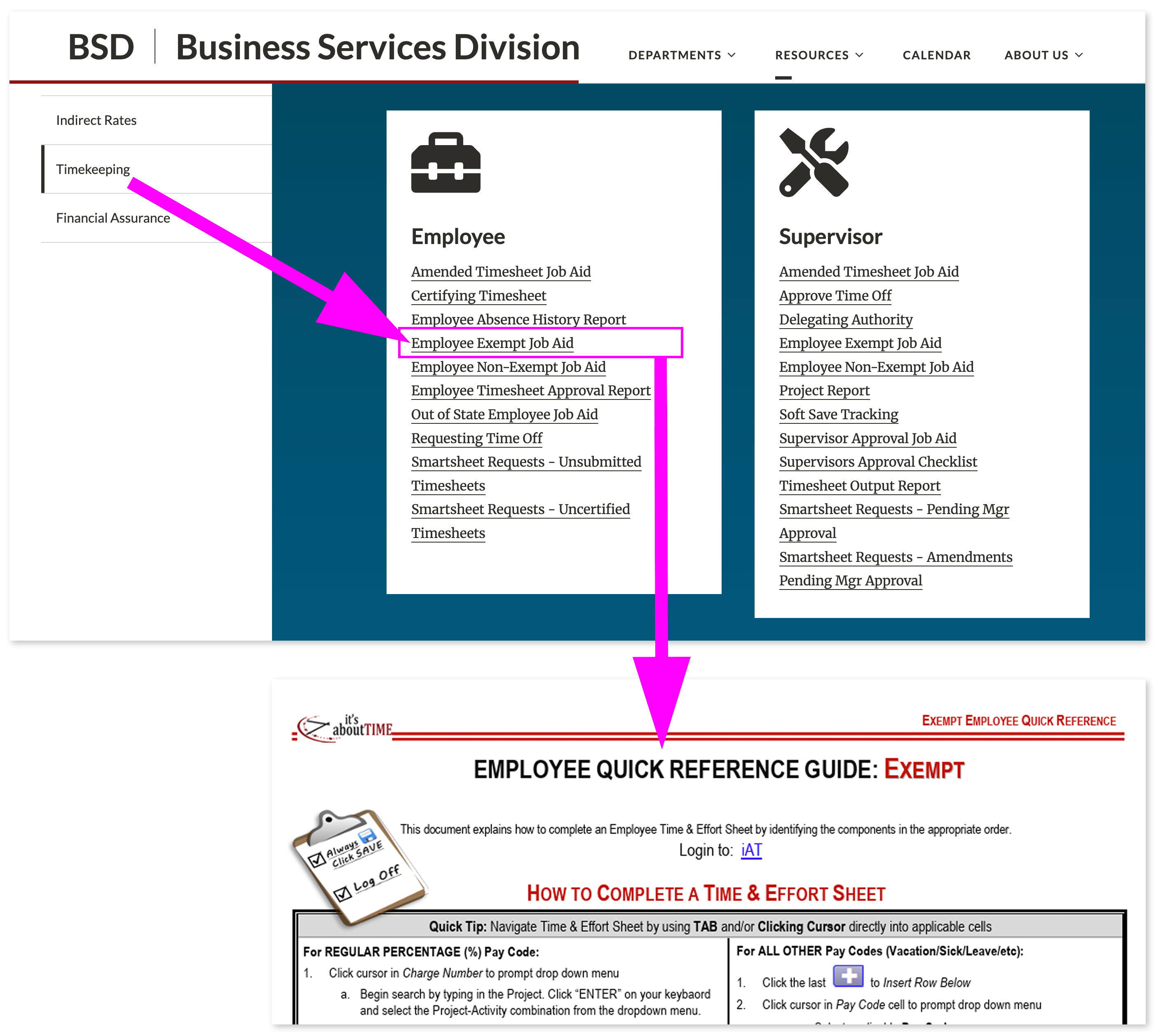
SLAC Timecard
Submit and manage your work hours.
Login credential: SLAC ID (username)
For help filling out your timecard, visit the BSD| Business Services Division site and review the Employee Exempt Job Aid.