Desktop Operating Systems
Windows 11 at SLAC
Table of Contents
- Windows 10 will be fully supported through October 2025. Windows 11 is supported at SLAC.
- Determining if your machine can upgrade to Windows 11
- If your system cannot be upgraded to Windows 11
- Steps to prepare for the upgrade to Windows 11
- List of all minimum system requirements for Windows 11
- Visual difference between Windows 10 and Windows 11
- List of SLAC purchased Dell models that can support Windows 11 upgrade
Microsoft has released Windows 11 as of October 2021. Microsoft has made improvements to features and reliability in Windows 11. SLAC IT has evaluated Windows 11 for general deployment and use within the SLAC community.
Windows 10 support is ending and some systems cannot upgrade to Windows 11
- Windows 10 reaches end of support on October 14, 2025. Windows 10 systems will not be allowed to connect to the SLAC network after this date.
- Windows 11 has some significant system requirements. Several of these requirements are rather technical and often non-trivial to assess. Generally, systems purchased prior to 2019 are unlikely to support Windows 11.
- Dell provides a list of models (see below) that can be upgraded to Windows 11. If a system is determined to be incompatible with Windows 11 it must be lifecycled.
Determining if your machine can upgrade to Windows 11
- The Windows 11 Upgrade Readiness tool has been made available in Software Center. This tool displays the upgrade readiness status of your system and indicates whether or not your machine is able to upgrade to Windows 11.
- You can find more information about the Windows 11 Upgrade Readiness tool in Knowledge Base Article KB0012825.
- If the Windows 11 upgrade is advertised to your system in the Updates tab of Software Center, it meets the Windows 11 system requirements and is ready to upgrade at any time.
If your system cannot be upgraded to Windows 11
- If your machine was determined that it cannot be upgraded to Windows 11 you must lifecycle the machine by sending it over to Salvage for proper disposal.
- You can find more information about how to salvage a computer here: KB0011249
- If you would like to purchase a new computer to replace that lifecycled computer then you can visit the IT Marketplace. https://it.slac.stanford.edu/marketplace
Steps to prepare for the upgrade to Windows 11
- Make sure your data is backed up using the approved applications: CrashPlan, OneDrive, Google Drive.
- Ensure 3rd party applications are up-to-date before initializing the upgrade to Windows 11.
- Applications in Software Center/Company Portal are ready for Window 11
- Ensure laptops are plugged in to a power source during the upgrade.
- Before starting the upgrade make sure you establish a stable internet connection. VPN is NOT required to be connected to.
- Disconnect from SLAC VPN before starting the upgrade.
Please allow 2-3 hours for the upgrade to Windows 11. Please Note: During the download and staging of the upgrade you can continue to work on the machine, and you will be prompted when a reboot is required to continue. Ensure that you have saved and closed anything you have been working on before rebooting. The upgrade will take another 30 minutes or so to complete following the reboot and you will not be able to work on the machine until it has finished.
List of all minimum system requirements for Windows 11
These are the minimum system requirements for installing Windows 11 on a PC. If your device does not meet these requirements, you may not be able to install Windows 11 on your device and might want to consider purchasing a new PC. If you are unsure whether your PC meets these requirements, you can use the PC Health Check app to assess compatibility. Note that this app does not check for graphics card or display, as most compatible devices will meet those requirements listed below.
Your device must be running Windows 10, version 2004 or later, to upgrade. Free updates are available through Windows Update in Settings>Update and Security.
- Processor – 1 gigahertz (GHz) or faster with 2 or more cores on a compatible 64-bit processor or System on a Chip (SoC).
- RAM – 4 gigabyte (GB).
- Storage – 64 GB or larger storage device Note: See below under “More information on storage space to keep Windows 11 up-to-date” for more details.
- System firmware – UEFI, Secure Boot capable. Check here for information on how your PC might be able to meet this requirement.
- TPM – Trusted Platform Module (TPM) version 2.0. Check here for instructions on how your PC might be enabled to meet this requirement.
- Graphics card Compatible with DirectX 12 or later with WDDM 2.0 driver.
- Display – High definition (720p) display that is greater than 9” diagonally, 8 bits per color channel.
- Internet connection – Windows 11 Pro for personal use and Windows 11 Home require internet connectivity and a Microsoft account during initial device setup.
Visual difference between Windows 10 and Windows 11
- Desktop and Start Menu – The Windows 11 desktop is now a more improved Aero look and feel to bring a calming look to the Windows Operating System. The Windows 11 Start Menu is now located in the middle of the Task Bar versus to the left in Windows 10.
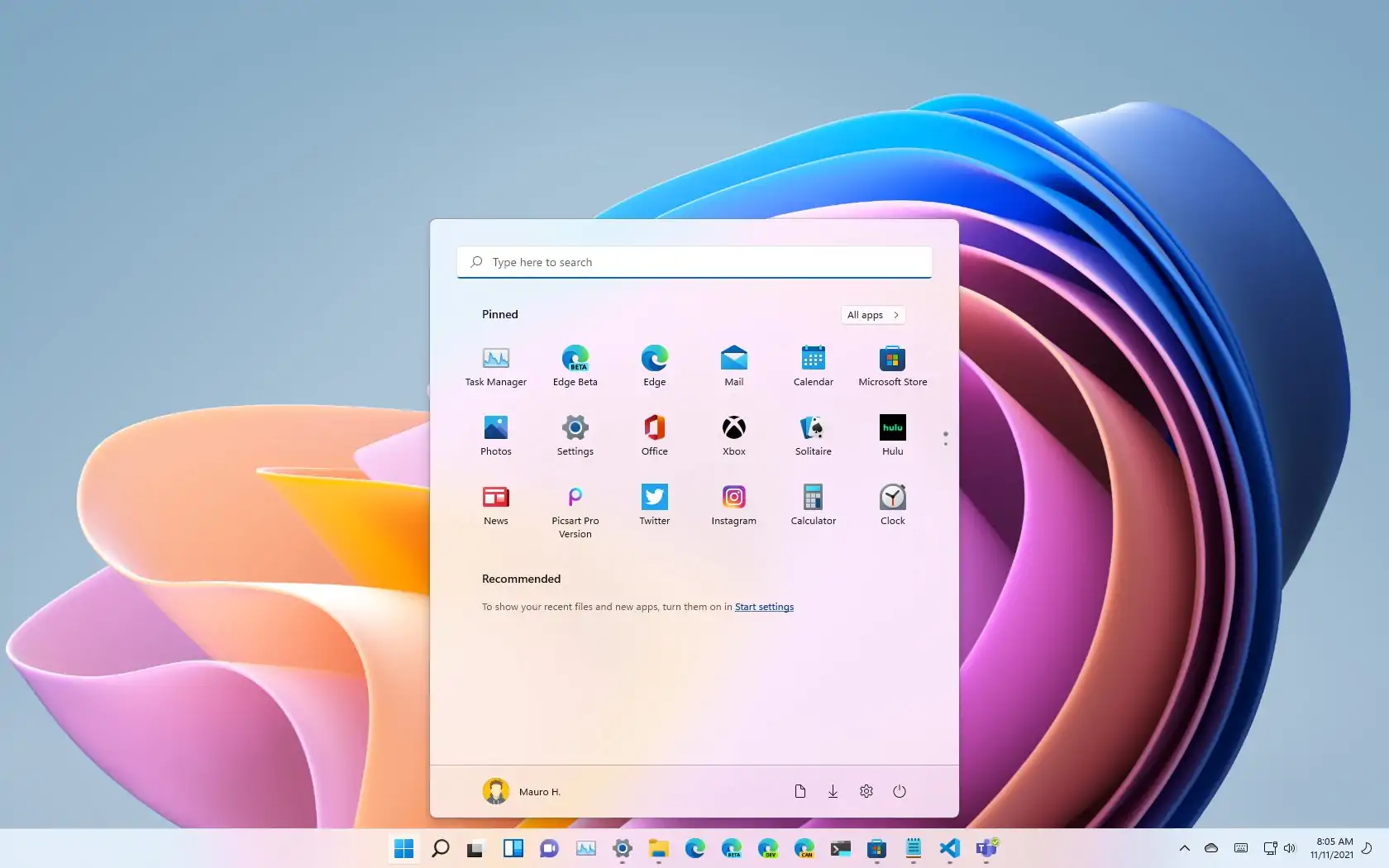
- Manage Multiple Desktops – Using the Task View button on the taskbar, you can create and access multiple desktops for all your application needs.
- Start Menu and Full Applications List – With Windows 11, you’ll have to click on ‘view all apps’ once you open the Start Menu in order to see the full list of applications installed on your machine.
List of SLAC purchased Dell models that can support Windows 11 upgrade
| Latitude | OptiPlex | Precision | Mobile Precision |
| Latitude 3120 | OptiPlex 3000 | Precision 3240 Compact | Precision 3530 |
| Latitude 3190 | OptiPlex 3060 | Precision 3260 Compact | Precision 3470 |
| Latitude 3190 2-in-1 | OptiPlex 3070 | Precision 3430 Small Form Factor | Precision 3540 |
| Latitude 3300 | OptiPlex 3080 | Precision 3431 | Precision 3541 |
| Latitude 3301 | OptiPlex 3090 | Precision 3440 Small Form Factor | Precision 3550 |
| Latitude 3310 | OptiPlex 3090 Ultra | Precision 3450 Small Form Factor | Precision 3551 |
| Latitude 3310 2-in-1 | OptiPlex 3280 All-in-One | Precision 3460 Small Form Factor | Precision 3560 |
| Latitude 3320 | OptiPlex 5000 | Precision 3630 Tower | Precision 3561 |
| Latitude 3330 | OptiPlex 5060 | Precision 3640 Tower | Precision 3570 |
| Latitude 3390 2-in-1 | OptiPlex 5070 | Precision 3650 Tower | Precision 3571 |
| Latitude 3400 | OptiPlex 5080 | Precision 3660 Tower | Precision 5530 |
| Latitude 3410 | OptiPlex 5090 | Precision 3930 Rack | Precision 5530 2-in-1 |
| Latitude 3420 | OptiPlex 5260 All-in-One | Precision 5820 Tower | Precision 5540 |
| Latitude 3490 | OptiPlex 5270 All-in-One | Precision 7820 Tower | Precision 5550 |
| Latitude 3500 | OptiPlex 5400 All-in-One | Precision 7920 Tower | Precision 5560 |
| Latitude 3510 | OptiPlex 5480 All-in-One | Precision 7920 Rack | Precision 5570 |
| Latitude 3520 | OptiPlex 5490 All-in-One | Precision 5750 | |
| Latitude 3530 | OptiPlex 7000 | Precision 5760 | |
| Latitude 3590 | OptiPlex 7060 | Precision 5770 | |
| Latitude 12 5290 | OptiPlex 7070 | Precision 7530 | |
| Latitude 12 5290 2-in-1 | OptiPlex 7070 Ultra | Precision 7540 | |
| Latitude 5300 | OptiPlex 7071 | Precision 7550 | |
| Latitude 5300 2-in-1 | OptiPlex 7080 | Precision 7560 | |
| Latitude 5310 | OptiPlex 7090 | Precision 7670 | |
| Latitude 5310 2-in-1 | OptiPlex 7090 Ultra | Precision 7730 | |
| Latitude 5320 | OptiPlex 7400 All-in-One | Precision 7740 | |
| Latitude 5330 | OptiPlex 7460 All-in-One | Precision 7750 | |
| Latitude 5400 | OptiPlex 7470 All-in-One | Precision 7760 | |
| Latitude 5401 | OptiPlex 7480 All-in-One | Precision 7770 | |
| Latitude 5410 | OptiPlex 7490 All-in-One | ||
| Latitude 5411 | OptiPlex 7760 All-in-One | ||
| Latitude 5420 | OptiPlex 7770 All-in-One | ||
| Latitude 5421 | OptiPlex 7780 All-in-One | ||
| Latitude 5420 Rugged | OptiPlex XE3 | ||
| Latitude 5424 Rugged | OptiPlex XE4 | ||
| Latitude 5430 | |||
| Latitude 5430 Rugged | |||
| Latitude 5431 | |||
| Latitude 5490 | |||
| Latitude 5491 | |||
| Latitude 5500 | |||
| Latitude 5501 | |||
| Latitude 5510 | |||
| Latitude 5511 | |||
| Latitude 5520 | |||
| Latitude 5521 | |||
| Latitude 5530 | |||
| Latitude 5531 | |||
| Latitude 5590 | |||
| Latitude 5591 | |||
| Latitude 7200 2-in-1 | |||
| Latitude 7210 2-in-1 | |||
| Latitude 7220 Rugged Extreme Tablet | |||
| Latitude 7220EX Rugged Extreme Tablet | |||
| Latitude 7290 | |||
| Latitude 7300 | |||
| Latitude 7310 | |||
| Latitude 7320 | |||
| Latitude 7320 Detachable | |||
| Latitude 7330 | |||
| Latitude 7330 Rugged Extreme | |||
| Latitude 7390 | |||
| Latitude 7390 2-in-1 | |||
| Latitude 7400 | |||
| Latitude 7400 2-in-1 | |||
| Latitude 7410 | |||
| Latitude 7420 | |||
| Latitude 7430 | |||
| Latitude 7424 Rugged | |||
| Latitude 7490 | |||
| Latitude 7520 | |||
| Latitude 7530 | |||
| Latitude 9330 | |||
| Latitude 9410 | |||
| Latitude 9420 | |||
| Latitude 9430 | |||
| Latitude 9510 | |||
| Latitude 9520 |
If you have any questions, please contact the IT Service Desk.


